Free Questionnaires
DASS-21or via Novopsych

Common Free Questionnaires Currently Available through Website or Novopsych
- DASS-21or via Novopsych
- DASS-Yvia Novopsych
- DASS-42 via Novopsych
- Beck Depression Scale
- SCARED Child (Anxiety Scale)
- SCARED Parent (Anxiety Scale)
- Kutcher Adolescent Depression Scale (KADS)
- My Life Satisfaction Diary
- Adult ADHD Self-Report Scale (ASRS) via Novopsych

Procedure for Questionnaires via weblink
- Click the above links and either complete with client in session, provide an ipad for client to complete their self or send link to client for completion
- Once the form is submitted, reception will receive an email
- Reception will upload the questionnaire to the client’s profile
- You can then access it by going to Power Diary and clicking the clients Records > Files
- Discuss results with client in following session and use clinical judgement and referral reasons to determine next steps (ie. Referral to another practitioner or service, change in therapeutic goals, further assessment needed)
Note: If you are needing immediate results, you will need to talk with reception prior to filling out the questionnaire with your client
Procedure for NovoPsych – In session
- Go to:Novopsych Login
- Enter username and password
Manager@therapyhouse.com.au
samson2022
- If you have never administered a questionnaire for this client via Novo Psych you will need to add their details via the new client Icon
- To administer a questionnaire in session, click the administer icon
- Once you've selected your client, you can select which test/s you would like to administer and click the 'Administer' button to proceed immediately

Procedure for emailing Novopsych questionnaires - Out of session
- Go to:Novopsych Login
- Enter username and password
Manager@therapyhouse.com.au
samson2022
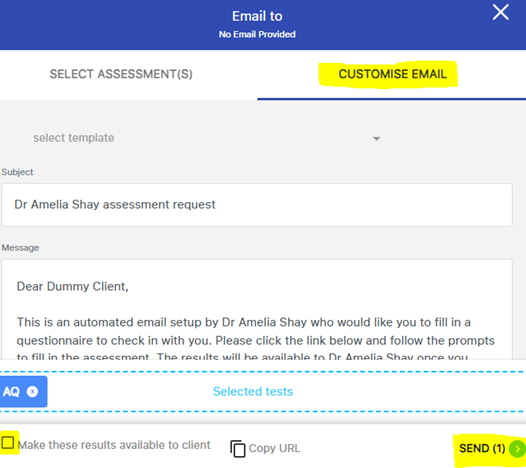
- Click the email Icon
- If you have never administered a questionnaire for this client via Novo Psych you will need to add their details via the new client Icon, ensuring that the clients email address is included
- Once you've selected your client, you can select which test/s you would like to send
- Click the 'Customise Email' tab to type your email message to the client and ensure that the box for results remains unticked.
- Click SEND for the email and link to be sent to your client for completion
Note: It is noted that clinicians are responsible for ensuring that psychometric validity and reliability is noted and assessments are used appropriately in the informal or formal capacity chosen. Novopsych availability does not automatically mean baseline psychometric properties have been met.
Checking and Saving Results - Novopsych
- Go to:Novopsych Login
- Enter username and password
Manager@therapyhouse.com.au
samson2022
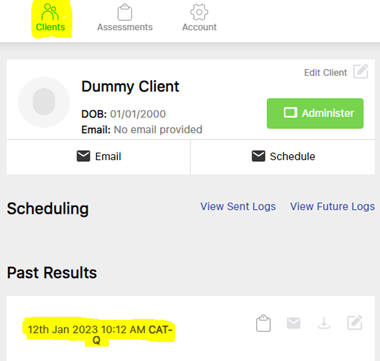
- Click on the Clients icon
- Select your client and click on the assessment administered
- Once you've selected your client, you can select which test/s you would like to view and/or download to add to the clients file.