Clinic Inboxes & Email
To ensure we stay on top of the Admin Inbox and keep it organised, it is important to categorise the emails we receive to update each other on the progress of the email.

Email Categories
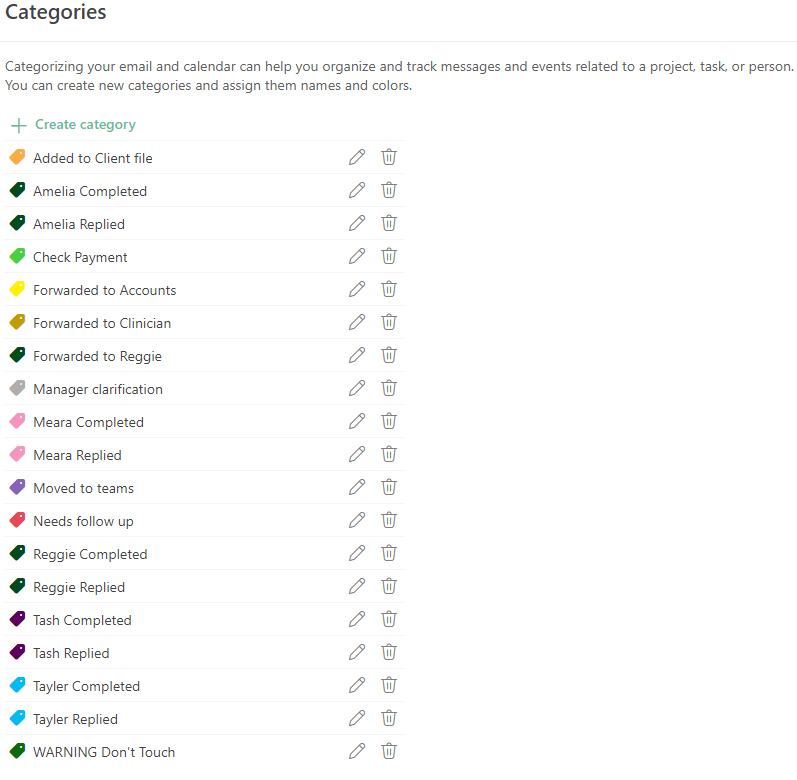
To ensure we stay on top of the Admin Inbox and keep it organised, it is important to categorise the emails we receive to update each other on the progress of the email. To assign a category to an email, right click on the email and select the relevant flag.
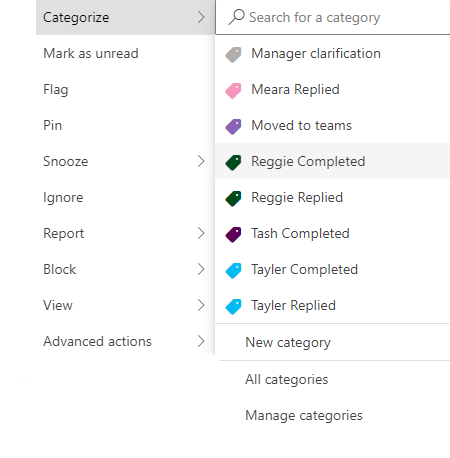
___ Replied
When you reply to an email, categorise the email as ___ Replied.
___ Completed
When the request has been completed, mark the email as ___ Completed and drag it into the COMPLETED folder.
Forwarded to Clinician
If you receive an email intended for a clinician, forward it to their email immediately. Once you have done this, reply to the client with:
“Hi ___,
Thank you for your email, I have passed this onto (clinician).
Please let me know if I can help with anything else in the meantime.”
Added to Waitlist Doc
If you receive an email with a referral and/or Mental Health Care Plan (MHCP) for a new client, add their details to the New Client Waitlist. Once added, move the email to the MHCP/REFERRALS folder.
Forwarded to Accounts
If you receive an invoice or receipt via email, or have scanned through a paper receipt to the inbox, forward this to accounts@therapyhouse.com.au. Once completed, use this flag and move to COMPLETED folder.
Emails Requesting Information
If we receive an email requesting information or asking to organise a meeting with a clinician to discuss a client, we must ensure we have consent from the client/family before we reply.
Employees:
- Check to see if we have a signed Authority to Discuss form giving consent for us to communicate with the person sending the email. If we don't have this on file, send the client the form to complete.
- In the client's profile, click on Communication → New Email.
- Under Templates, select Authority to Discuss.
- Edit the email from (e.g. School Guidance Counsellor, Teacher, OT, Speech Therapist, Social Worker etc.) to the name of the person requesting contact.
- Send the email.
- Forward the email to the relevant clinician.
- Once the form is completed, we will get an email in the admin inbox. Forward this onto the clinician as well.
- Reply to the original email and facilitate the request.
Consultants:
- Forward the email to the consultant.
- Reply to the email with:
- "Thank you for your email, we have passed this onto ____".
Emails To Clinicians
If we receive an email with information from a client or parent in relation to therapy, we must send this onto the clinician and save the email to the client's file.
Employees and Consultants:
- Forward the email to the clinician.
- Reply to the email with
- "Thank you for your email, we have passed this onto ____.
Please let us know if we can help with anything in the meantime."
- "Thank you for your email, we have passed this onto ____.
- Save the email as a PDF:
- Click on the ellipsis on top right corner of the email and click Print.
- Click Destination: Save as PDF.
- Save the file as Email from [Parent/Doctor etc] re: [Client] [Date].
- In the Client's Profile, save the PDF email into Records →Files.
Follow the same two steps if the email is a general request or question for the clinician that we cannot action.
Emails With Documents
If we receive an email with documents relevant to a client from the client/parent or third party, ensure that the documentation is saved to the client's file.
Employees and Consultants:
- Forward the email to the clinician.
- Reply to the email with:
- "Thank you for your email, we have passed this onto ____ and saved this to [Client]'s file".
- Download the document/s.
- In the Client's Profile, save the PDF email into Records → Files.
- If the document is a client's referral/MHCP or NDIS goals, save this in Admin → Admin Files.
Referrals & MHCPs or NDIS Goals
- If the document is a referral or MHCP from a GP clinic:
- Download the document.
- In the Client's Profile, save the document into Admin → Admin Files.
- If the document is a referral or MHCP from the client:
- Reply to the email with:
- "Thank you for sending this through, we have save it to your/your child's file".
- Download the document.
- In the Client's Profile, save the document into Admin → Admin Files.
- Reply to the email with:
- If the document is NDIS Goals from the client:
- Forward the email to the clinician.
- Reply to the email with:
- "Thank you for your email, we have passed this onto ____ and saved this to [Client]'s file".
- Download the document.
- In the Client's Profile, save the document into Admin → Admin Files.
Submitted Forms
DASS/Y, KADS & SCARED
DASS/Y, KADS, SCARED responses are received into forms@therapyhouse.com.auinbox. Check to see if these responses have been added to the client's file - if not, save the email by selecting 'Print to PDF' and save under Records → Files.
Questionnaires & Screeners
Questionnaires and screeners are received into admin@therapyhouse.com.au inbox. Check on the relevant assessment provider portal to see if these forms have been generated. If not, generate these reports and saved under Records → Files.
Workshop Enquiries
Workshop enquiries are received into the forms@therapyhouse.com.au email. This is automatically forwarded to the admin inbox.

Email privacy & shared addresses
Email Client Privacy
To ensure we maintain our clients' privacy and confidentiality in line with our Privacy Policy, using as little information about our clients in email communication is essential.
Emails:
- Do not use the client's full name in the subject line or body of email.
- We can use the client's initials and Power Diary ID in the subject line of email.
- Keep the client's personal identifiable info to a MINIMUM in the body of emails as this limits potential breaches of confidentiality
- Clinicians are encouraged to limit how many people are being CC'd in emails, as this increases the chance of confidentiality breaches/personal info exposure
- Always ensure that the client is aware their personal info is not being passed around within an insecure computer system
Forms Email
The forms@therapyhouse.com.au inbox receives:
- Consent Forms
- Completed Assessments, Screeners and Questionnaires
If you have requested your client complete a DASS, SCARED, KADS or similar form, these responses will be sent here.
Power Diary Email
To ensure we have record of communication with our clients, we recommend starting email contact through Power Diary. Other communication should be uploaded to client files as per record keeping policy.