New Clients
If a new client does not have a Referral and/or Mental Health Care Plan directed to a particular clinician, you may need to match the client to the best suited clinician.

Matching Client to Clinician
If a new client does not have a Referral and/or Mental Health Care Plan directed to a particular clinician, you may need to match the client to the best suited clinician. If a new client has been referred to a specific clinician who may not be taking new clients, it is important to know which psychologist is best equipped to work with the new client.
If the new client has a complex issue or situation that they're seeking help for, write down as much information as possible and ask the clinicians who has the best skill set, experience and capacity to take on the client.

New Client Enquiries
Phone Calls
- If we receive a phone call enquiring about booking an appointment as a new client, ensure that you ask:
- If the appointment is for an adult or a child (if child, ask for their age).
- If they have been to their GP for a referral or if they are using NDIS funding.
- What they are seeking support with:
- e.g. "can I ask what you are looking for support with? This will help me match you/your child to the best clinician".
- Ongoing therapy vs assessment.
- If their best contact number is the one they are calling from and for their email address.
- If we have immediate availability and no one on the waitlist:
- Discuss the options for appointments/clinicians with the client based on their needs and book them directly into the Zanda calendar
OR
- Offer to send them an email with the available clinicians that are best suited to the client with each availability and price breakdown.
- If we have an active waitlist:
- Let the client know how long the approximate wait time for an initial appointment is and ask them if they would like to be placed on the waitlist:
- e.g. "We are looking at early March if you're happy to wait until then. I'd be happy to place you on our waitlist, and get in contact with you shortly to book this appointment in".
- Let the client know how long the approximate wait time for an initial appointment is and ask them if they would like to be placed on the waitlist:

Emails
- If we receive an email enquiring about booking an appointment as a new client, ensure you that you ask (if the email does not clearly state):
- If the appointment is for an adult or a child (if child, ask for their age).
- If they have been to their GP for a referral or if they are using NDIS funding.
- What they are seeking support with:
- e.g. "can I ask what you are looking for support with? This will help me match you/your child to the best clinician".
- Ongoing therapy vs assessment.
- What their best contact number is
- If we have immediate availability and no one is on the waitlist:
- e.g. "Hi ___,
Thank you for your enquiry. Based on your email, I feel that our psychologist ___/the below clinicians would be a great fit in supporting you/your child.
- e.g. "Hi ___,
With a referral and Mental Health Plan from your GP, you are able to receive 10 Medicare rebates of $98.95 per calendar year.
____'s initial appointment fee is $340 ($241.05 out-of-pocket) and ongoing appointment fee is $270 ($171.05 out-of-pocket). Her upcoming availability is:
Please let me know if you have any questions or would like to book any of the above times.
- If we have an active waitlist:
- e.g. ""Hi ___,
Thank you for your enquiry.
- e.g. ""Hi ___,
We would love to book you/your child in with one of our clinicians and would be happy to place you on our waitlist. We would be looking at late Feb/early March to book you in, and I will send through some options and availability in the next week or so.
Can I confirm your best contact number and your/your child's full name?
- Add the client to the New Client Waitlist.xlsxdocument.
How to Add a New Client in Zanda
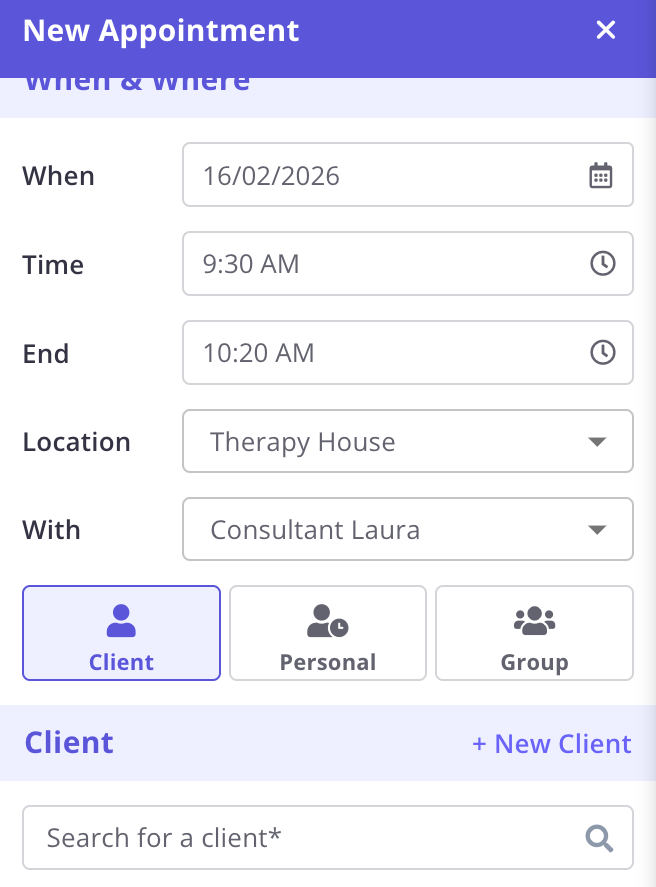
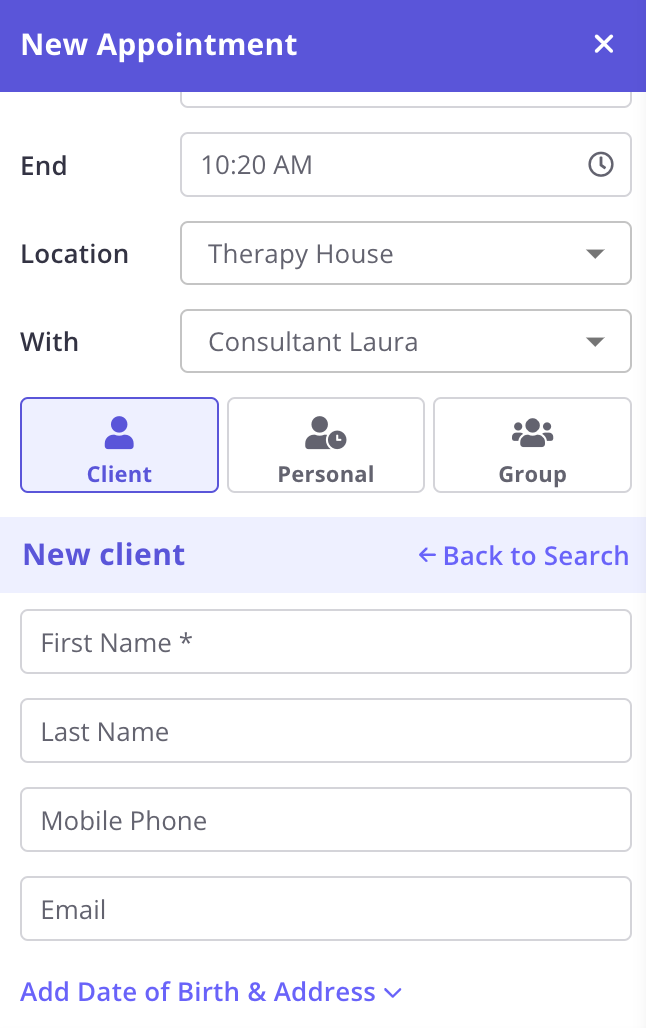
- Click and drag on the blue Zanda background so you have highlighted the 50 minute slot, and select " + New Client".
- Fill in the clients "First Name", "Last Name", ensure these are the clients details, not the parent (if it is a parent calling to book their child as the client).
- Add in the mobile phone number and the email address.
- Important: ensure if the client is under 18 that the phone number and email are the parent's details.
- Select the "Service".
- This is the the appointment type. If it's a new client, it will always be an initial appointment. Ensure you have selected the correct appointment type depending which clinician the client is seeing.
- Select the "Flag" to "Initial Appointment".
- Save the new appointment.
- Go to the Client's Profile.
- Select Communication → New Email and select their initial appointment in "Related Appointment".
- Under "Templates" select "New Client Welcome Email (Adult/Child) 2026" depending whether the client is an adult or a child OR "Laura/Sahar/Letitia New Client (Adult/Child)"
- Save and Send the email.
- Select Communication → New SMS and select their initial appointment in "Related Appointment".
- Click "Appointment and Fee Prov/Medicare" depending whether the client is seeing a provisional psychologist or a registered psychologist with Medicare rebates.
- Edit the text to ensure the correct fees and rebate amount is included in the SMS.
- Save and Send the SMS.

New Client Consent Forms
Employees:
- Once a new client has completed their consent form, we will receive an email from Zanda in the admin inbox notifying us that the form has been submitted.
- Click View Form in this email and a new tab will open showing you the form in the client's profile.
- Open a new tab and enter the Client Profile.
- In Profile→ Details, click on Status and select Active.
- In the consent form tab, read through the completed form and transfer any details across into Profile → Details.
- Date of Birth
- Medicare/NDIS number
- Set up the client's contacts in Profile →Contacts.
- For child clients:
- Parents/guardians
- Select Create New Contact if new to clinic
- Select Create from an Existing Profile if known to the clinic
- Select relevant Relationship to client and transfer across details
- Note: Make sure to add the date of birth and Medicare details for parent nominated as the Medicare claimant.
- Save.
- NDIS Plan Manager if applicable
- Select Create from an Existing Profile and search for the NDIS plan management company
- If nothing comes up, select Create New Contact.
- Set Relationship to Invoices.
- Save.
- Select Create from an Existing Profile and search for the NDIS plan management company
- Parents/guardians
- For adult clients:
- Emergency contact
- Select Create New Contact if new to clinic
- Select Create from an Existing Profile if known to the clinic
- Select relevant Relationship to client and transfer across details.
- NDIS Plan Manager if applicable
- Select Create from an Existing Profile and search for the NDIS plan management company
- If nothing comes up, select Create New Contact.
- Set Relationship to Invoices.
- Save.
- Select Create from an Existing Profile and search for the NDIS plan management company
- Emergency contact
- For child clients:
- In Billing → Billing Setup, select Bill To: and click on either the Medicare claimant or NDIS Plan Manager. You can also set the Preferred Service or Pack to reflect the client's invoice item (e.g. General Ongoing Appointment, Clinical Ongoing Appointment, NDIS etc.)
- In Admin → Manage, confirm that the Primary Practitioner is correct and change the Default Appointment Flag if the client is Self/Plan Managed.
Consultants:
- We will not receive an email from Zanda letting us know that a consultant's client has completed their consent form.
- To check if a consent form has been completed, open the Client Profile and select Records → Files.
- If the details have not been inputted for the client, follow the above steps.