Teams & Planner
At Therapy House, we use Microsoft Teams & Planner to communicate between clinicians and admin; and document shared tasks in a central location.


PLANNER FOR TASKS
Task creation is best when fields are filled out accurately so minimal follow up is required.
- Ensure you list yourself as one of the 'assigned' people so you receive updates on the task
- Use the labels to indicate who is required for the next action - ie. If a clinician is creating a task for questionnaires - you need to add AWAITING ADMIN label, so admin can clearly see they need to complete > then admin will change the label to AWAITING CLIENT once they have actioned. Please note that admin have over 100 tasks they are tagged in at any time - so these labels are important
- Set a due date if applicable and add any relevant information in the notes section that may assist with others completion
Team/Planner Tasks Details:
To ensure we maintain our clients' privacy and confidentiality in line with our Privacy Policy, we must use as little identifiable information in Tasks as possible.
- Name the Task with the client's First and Last Name, along with their Power Diary ID number. Include details in the Notes section related to the Task.
- Once the Task has been completed, replace the client's name with their initials only and remove any personal information (name, DOB, contact details, address etc.) from the Notes section before completing the Task entirely.
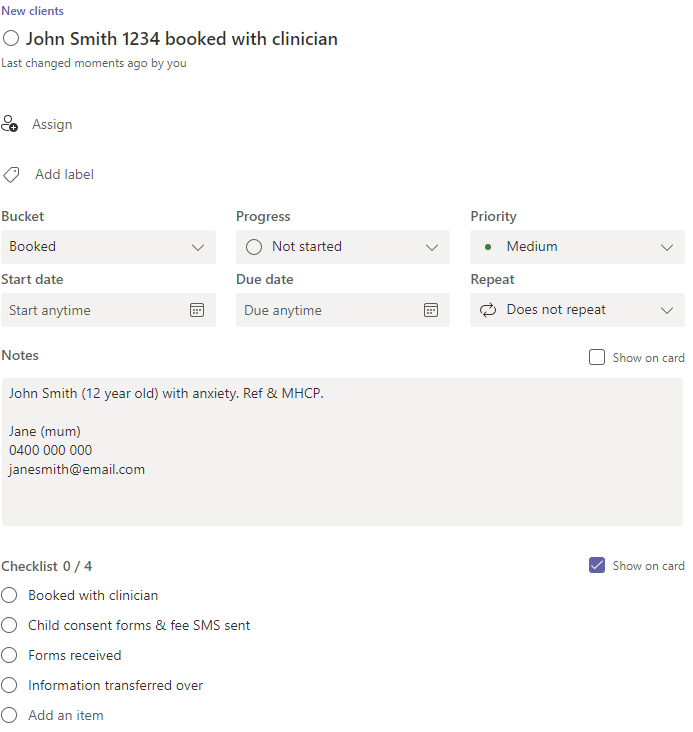
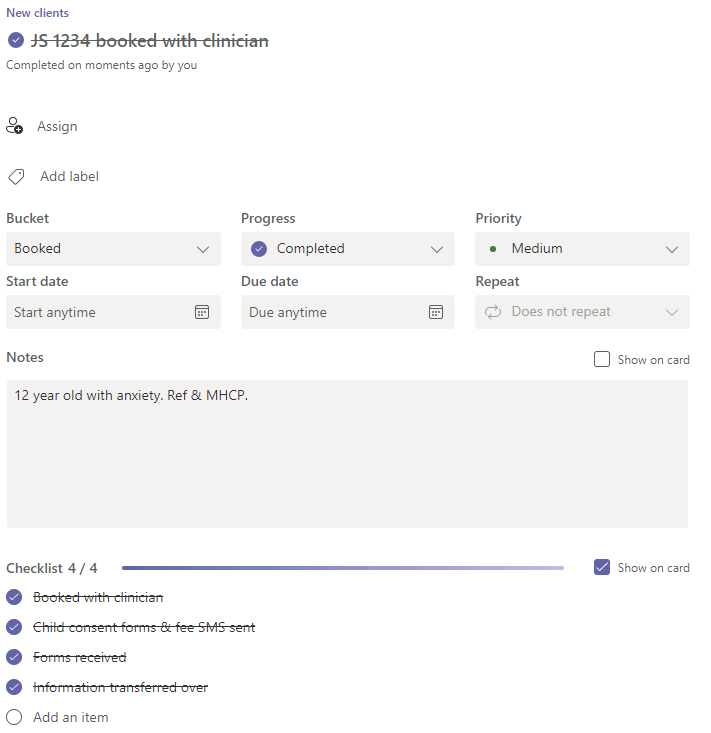
Note: Do NOT comment on a Task with any identifiable information about a client as comments cannot be deleted or edited!