Invoicing for Assessments
Assessments For assessments that include WISC, WIAT, MIGDAS or UNIT assessments, invoices are created via Square.

Invoicing for Assessments/Questionnaires
Assessments
For assessments that include WISC, WIAT, MIGDAS or UNIT assessments, invoices are created via Square.
Creating a Square Invoice:
- Under the Invoices tab in Square, click 'Create Invoice'.
- If the client has been sent an invoice via Square previously, search for their name. If a Square invoice has not been sent to them before, create a new customer and input their details.
- If the client being assessed is a child, create the customer in the parent's name.
- Add the Invoice Title based on the type of assessment being invoiced.
- Amend the Invoice Message to say: "Please see your invoice attached for assessment with a Therapy House clinician."
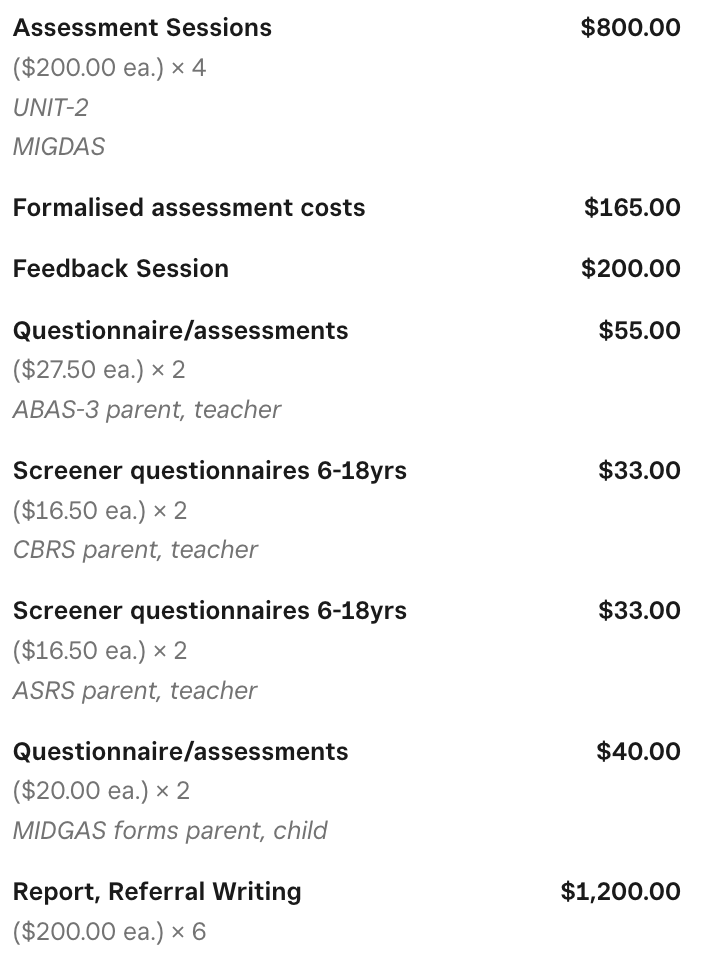
- Based on the cost proposal quote (found in the Assessments Teams Task), input the individual line items for the assessment.
- For each item, write a description under Notes. For example, if the item line is Questionnaire/assessments include the type of questionnaire (BRIEF-2, ABAS-3, etc.)
- Check the total and send.
Questionnaires/Screeners only
For assessments that only include questionnaires/screeners without report writing, invoices can either be created via Square or added to an existing Power Diary invoice.
Creating a Square Invoice:
- Under the Invoices tab in Square, click 'Create Invoice'.
- If the client has been sent an invoice via Square previously, search for their name. If a Square invoice has not been sent to them before, create a new customer and input their details.
- If the client being assessed is a child, create the customer in the parent's name.
- Add the Invoice Title based on the type of assessment being invoiced.
- Amend the Invoice Message to say: "Please see your invoice attached for questionnaires requested by a Therapy House clinician."
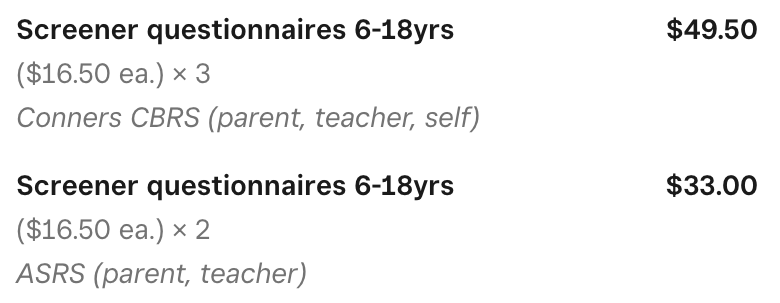
- Based on the cost proposal quote (found in the Assessments Teams Task), input the individual line items for the assessment.
- For each item, write a description under Notes. For example, if the item line is Questionnaire/assessments include the type of questionnaire (BRIEF-2, ABAS-3, etc.)
- Check the total and send.
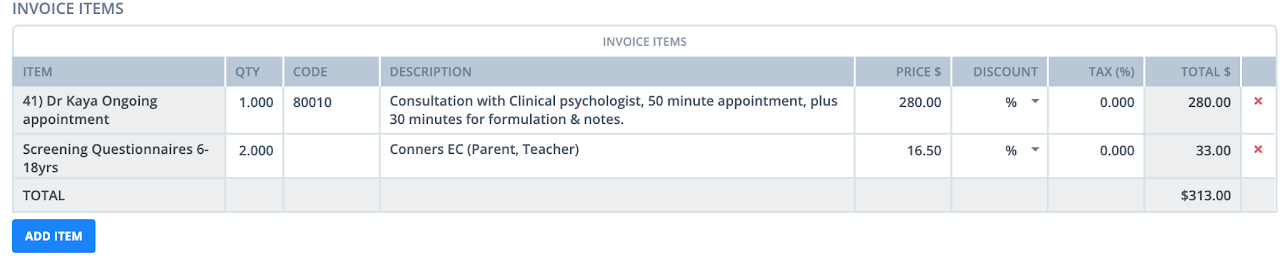
Power Diary Invoice:
- Find the client's next appointment in Power Diary.
- Based on the cost proposal quote (found in the Assessments Teams Task), input the individual line items for the assessment.
- Charge the client's saved card at the time of the appointment.